Immo ManagerImmo Manager

Portal export

Enter it once, keep every portal current

Connect your portal accounts once. From then on, every property you create or change goes to all active portals – to ImmobilienScout24 through its official interface, to Immowelt and others via OpenImmo.

No credit card · cancel any time

  • ImmobilienScout24 through its import/export interface
  • Immowelt and other portals via OpenImmo file
  • Every change goes to all active portals
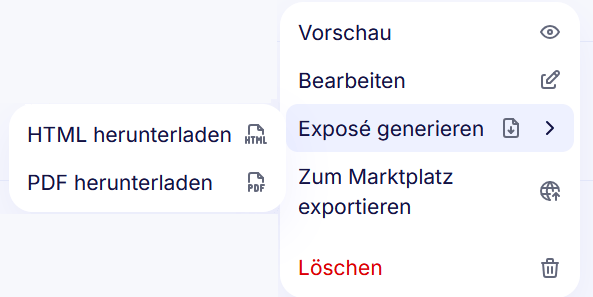
Property menu in Immo Manager with "Generate exposé" and "Export to marketplace"

Your accounts, your contract with the portal

Immo Manager publishes with your own credentials. For ImmobilienScout24 you enter the consumer key and secret from its self-service portal and approve access once at ImmobilienScout24. For Immowelt you enter the FTP credentials Immowelt gives you; the server is preset.

  • Other portals via OpenImmo over SFTP, FTP or FTPS, with password or SSH key
  • "Test connection" before you save
  • Credentials are stored encrypted

What goes out, and when

When you save a property, it goes to every active portal, with its images and the first one as cover. ImmobilienScout24 lists flats and houses for rent or sale. Delete a property or take it down with "Remove", and Immo Manager withdraws the listing from the portals.

  • "Export to marketplace" on the property, "Export all properties" per account
  • OpenImmo 1.2.7 as a ZIP with XML and images

See errors instead of hunting for them

If a listing lacks a required field, Immo Manager says which, for example that the base rent is missing. A failed export is retried up to three times; if it still fails, you get a notification with the reason.

  • On the property: status, external ID and link per portal
  • Per account: sync status, successful and failed exports
  • "Retry" for one export or all of them

Bring your listings from your old software

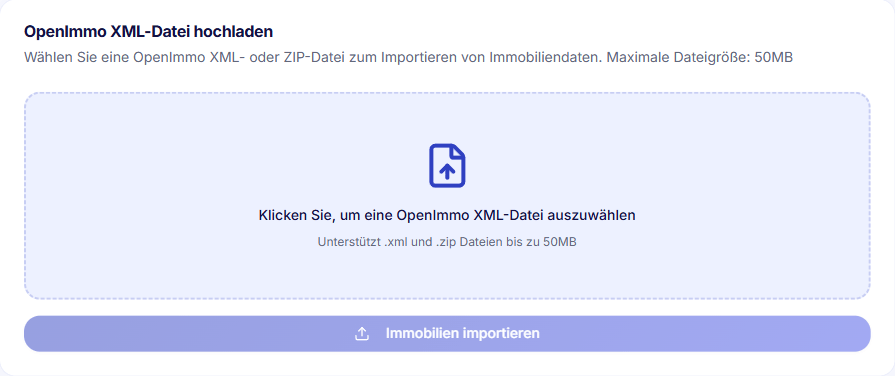
Export your properties from your previous software as an OpenImmo file and upload it to Immo Manager, as XML or ZIP up to 50 MB. New properties are created, known ones updated by their external ID.

OpenImmo import in Immo Manager: upload an XML or ZIP file up to 50 MB

What it cannot do yet

  • Commercial properties, plots and garages do not go to ImmobilienScout24 – there it is flats and houses.

From the Professional plan

Portal export is part of the Professional and Business plans. The OpenImmo import works on every plan.

Compare plans

Frequently asked questions

Yes. You register API access in the ImmobilienScout24 self-service portal, enter the consumer key and secret in Immo Manager and approve access once at ImmobilienScout24.

Ask Immowelt for FTP credentials for the OpenImmo import – not your portal login. The server is preset in Immo Manager.

Flats and houses, for rent or for sale. The base rent or purchase price and at least one room must be filled in.

Immo Manager retries it up to three times. If it still fails, you get a notification with the reason and can retry it by hand.

Yes. Delete or remove a property and Immo Manager withdraws it from every portal it was published on.

Put your next property on the portals

Enter your properties once and let Immo Manager do the rest – free for 14 days, no credit card.

Try 14 days free

Questions? Write to us: kontakt@immo-manager.io

We use cookies

We use cookies to improve your experience and analyze site traffic. Read our Cookie Policy