Immo ManagerImmo Manager

For real estate agents

Agent software for sales and lettings

One system for your listings business: generate the exposé, publish to the portals, take prospects through the pipeline and invoice your commission – whether the property is for sale or to let.

No credit card · cancel any time

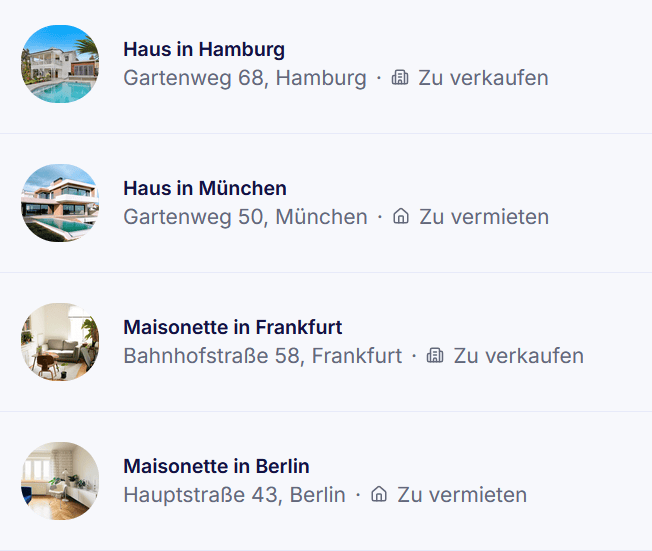
Property list in Immo Manager with houses and flats, each marked for sale or to let

Sales and lettings in one system

Properties for sale and to let sit in the same list. What differs is the path to the deal.

Sales

  • Properties for sale with a purchase price and status up to reserved and sold
  • Exposé as a PDF, and a sale listing on ImmoScout24 for flats and houses
  • Buyer, seller or split commission, with a commission invoice
  • Buyers in the same pipeline as prospective tenants

Lettings

  • Properties to let with net and gross rent
  • Online exposé: the cancellation notice and the brokerage agreement are confirmed before viewing
  • Whoever signs becomes a tenant in one click – nothing typed twice
  • If you also manage the property, the lease and payments continue in the same system

What agents do with it day to day

Everything here is in the product today. Where a feature needs a particular plan, it says so.

Exposé and online exposé

The exposé is generated from the property details as a PDF or HTML. By link, the prospect views it online after confirming the cancellation notice, consent to immediate service and the brokerage agreement – each step is recorded. Anyone who does not finish is reminded automatically.
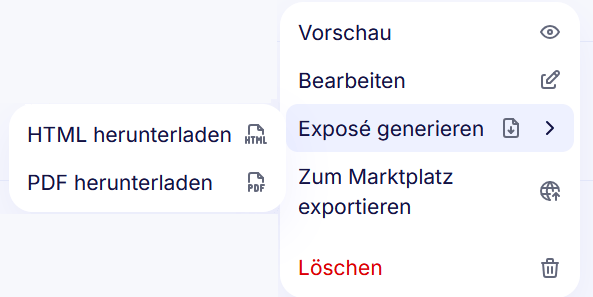
Property menu in Immo Manager: download the exposé as HTML or PDF, export to a marketplace

Portal export

Professional plan and up

ImmobilienScout24 through the official API, Immowelt and other portals via OpenImmo – with your own credentials. Changes to a property reach every connected listing automatically. Bring your stock across from other software with an OpenImmo import.

Prospect pipeline

A board with stages from “interested” through “exposé viewed” and “followed up” to “won” or “lost”. Drag cards to move them on. When someone has seen the exposé and not replied, Immo Manager reminds you to follow up.

Search profiles

Record what each contact is looking for: property type, buy or rent, location, price range, rooms and living area. Immo Manager shows you the matching properties, ranked by fit.

Website widget

Business plan

Embed your properties on your own website with a code snippet. You choose which properties appear; an enquiry through it creates the contact and the prospect directly in Immo Manager.

Email inbox

Professional plan and up

Connect your mailbox over IMAP and SMTP. Conversations attach to the contact, and templates with placeholders save retyping recurring emails.

Commission and commission invoice

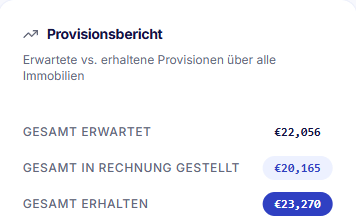
Record the expected commission for each property – buyer side, seller side or split – and track it until it arrives. Generate the invoice as a ZUGFeRD PDF with a sequential number, with a cancellation invoice if needed.

Commission report in Immo Manager: expected, invoiced and received commissions

Working as a team

Several users per agency, with roles for administrators and staff. Show your colleagues’ appointments in the calendar; viewings are tied to the contact and the property.

Viewing appointment on a contact in Immo Manager: house in Munich, planned

For agents: Professional

Portal export and the email inbox start with the Professional plan; Starter has neither and suits landlords with a few properties. The website widget belongs to the Business plan. Prices and limits are on the pricing page.

Compare plans

Questions agents ask

Yes. Properties for sale get a purchase price, an exposé, export as a sale listing to ImmobilienScout24, and buyer and seller commission with a commission invoice. There is no dedicated sales flow with reservation and notary appointment yet; you take buyers through the pipeline and the property status.

ImmobilienScout24 through its official API, Immowelt via OpenImmo over FTP, and any other portal that accepts OpenImmo over SFTP, FTP or FTPS – each with your own credentials. Portal export is included from the Professional plan.

Properties come in through an OpenImmo import as XML or a ZIP with images, contacts through a CSV import with field mapping. Both are included in every plan.

You take them on as the tenant of the property in one click. Contact details and documents stay on the same contact; nothing is entered twice. If you also manage the property, the lease, payments and service charges continue in the same system.

Yes, with the website widget in the Business plan. You add a code snippet to your site and choose which properties appear. Enquiries through it arrive as a contact and a prospect in Immo Manager.

On servers in Germany, stored GDPR-compliantly and encrypted. You can export your data as PDF or CSV at any time.

Try it with a real listing

Add your next property, generate the exposé and see how your agency works with it – 14 days free, no credit card.

Try 14 days free

Questions? Write to us: kontakt@immo-manager.io

We use cookies

We use cookies to improve your experience and analyze site traffic. Read our Cookie Policy
